
Accessing Your Drip Casino Account
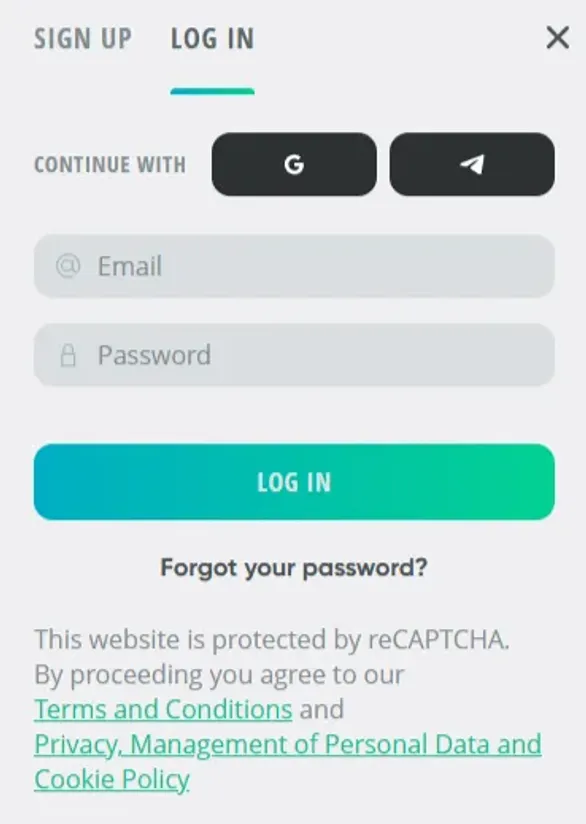
Canadian players can enter the same Drip Casino account in three ways: email and password, Google account, or Telegram. All three routes land you in the same profile, so just stick with the one that feels quickest for you. The casino offers Google and Telegram registration options for faster sign-in alongside the traditional email method.
Email login uses the address you signed up with plus your password. When you choose Google, you pass through the standard OAuth window, so you are not creating a separate password just for us. Telegram login links your casino profile with your messenger account, which is especially handy if you mostly play on your phone.
If you tick “Remember me” on a trusted device, your session can stay active for up to 30 days. When you skip it, inactivity over 24 hours logs you out automatically. We also end sessions when we spot different IP addresses trying to use the same account at the same time - that is one of our basic anti-hijack checks.
Step-by-Step Login
Before you enter your details, take 2 seconds to confirm you are really on our official domain. Scam clones sometimes copy our layout almost pixel for pixel.
To log in:
- Open your browser and type in our main URL.
- On the homepage, look at the top-right corner for the Login button.
- Click it - a small window or panel will pop up.
- Pick how you want to sign in: email, Google, or Telegram.
- Enter the email address you registered.
- Type your password and quickly check that Caps Lock is not stuck.
- Turn on “Remember me” only if this is your own device.
- Press the Sign In button.
- If two-factor authentication is active, enter the 6-digit code from your authenticator app.
- Wait a moment while we verify everything and then you will be redirected to your account dashboard.
Once you are in, the dashboard shows your current balance, any active bonuses, the last games you played, plus shortcuts to deposits and withdrawals. On the very first login after signing up, you might see a welcome bonus screen. You need to accept the specific terms before the promo money appears in your bonus balance.
Resetting a Forgotten Password
Password recovery runs fully through your registered email and the reset link only works for 60 minutes.
Use the link below the login fields: click “Forgot Password”. Then type in the email you used during registration and submit the form. Go to your inbox, open the message from us, and hit the verification link before the 60 minutes pass. You will be asked to create a new password with at least eight characters, including one capital letter, one number, and one special symbol. Enter it twice, confirm, and then return to the login screen to sign in with the new credentials.
Usually the email appears in under two minutes. If nothing comes through, check spam or junk folders and make sure you did not mistype the email. For security, we only allow three reset attempts in a 24-hour period, which blocks automated scripts from spamming your address.
Two-Factor Authentication
Two-factor authentication adds a second step on top of your password. We work with standard authenticator apps such as Google Authenticator, Authy, and Microsoft Authenticator.
To switch it on, head to your account security settings after you sign in. There we display a QR code. Scan it with your chosen authenticator app, then type the current six-digit code from that app into the confirmation field. When activation is finished, we also generate backup codes - store them safely in case your phone is lost or reset.
From then on, each login requires your account password and the live six-digit app code. These codes refresh roughly every 30 seconds, and we keep a short 90-second window to handle minor time differences between devices. After five wrong 2FA codes, the account locks and you will need to complete an email verification step to unlock access.
Active Sessions and Security
We maintain a list of active sessions tied to your account, so you always see where you are logged in. In the security section, you can review IP addresses, device types, browsers, and timestamps. That record makes it easier to catch access that does not look like yours.
| Session Parameter | Details |
|---|---|
| Maximum concurrent sessions | up to 3 devices (maximum) |
| Session timeout (inactive) | 24 hours (without activity) |
| Session timeout (with “Remember me”) | 30 days (with “Remember me”) |
| IP change detection | Automatic logout |
| Failed login threshold | 5 failed attempts |
From the same security dashboard, you can manually terminate any session. This is especially important after playing from a public computer or a shared console at home. When you end a session, we immediately invalidate that login token, so that device has to go through the full login flow again.
We retain logs of login attempts for 90 days and send an email when we spot access from a device or IP that is new for your profile, or from a different region than usual. While traveling abroad, you may be asked to confirm an extra email link before you continue to the lobby.